Sequelize Xtra CLI
Power‑packed CLI for Sequelize ORM, simplifying DB config, model scaffolding, and migrations.
Node.jsSequelizeCLI
 NPM Link
Sequelize Xtra CLI
Overview
sequelize-xtra-cli is a power‑packed, next‑gen command‑line interface for the Sequelize ORM. It streamlines common development tasks such as initializing a database configuration, scaffolding models, and generating migrations. The tool runs on Node 22 and can be invoked via npx.
Features
- Database configuration wizard – Quickly create a
config/database.js(or.ts) file with support for multiple environments (local,dev,prod). - Model scaffolding – Generate a Sequelize model file with custom table name, attributes, primary key, indexes, foreign keys, unique constraints, composite uniques, timestamps, and soft‑delete support.
- Migration generation – Produce a migration file that matches the generated model, handling custom file naming and model‑path resolution.
- Full CLI help – All commands expose
-h/--helpwith detailed option tables.
Installation
# Run the CLI directly with npx (no global install required)
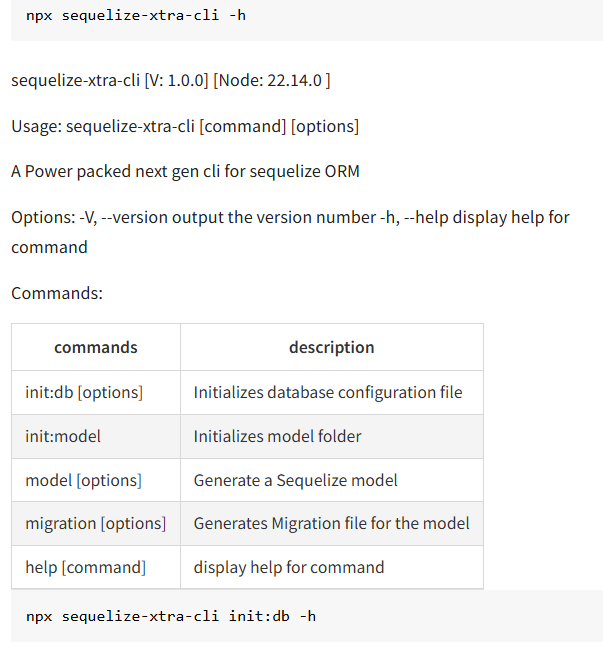
npx sequelize-xtra-cli -h
The CLI reports its version and Node runtime:
sequelize-xtra-cli [V: 1.0.0] [Node: 22.14.0]
Commands & Usage
1. Initialise Database Configuration
npx sequelize-xtra-cli init:db -h
Options
| Option | Description |
|---|---|
-e, --envs [items] | Comma‑separated list of environments to create (default: "local","dev","prod"). |
-f, --force | Overwrite an existing configuration file. |
-h, --help | Show help for this command. |
2. Initialise Model Folder
npx sequelize-xtra-cli init:model
Creates a models/ directory (if it does not exist) ready for scaffolding.
3. Generate a Model
npx sequelize-xtra-cli model -h
Key Options
| Option | Description |
|---|---|
--mn, --model-name <model-name> | Name of the model class (e.g., User). |
--tn, --table-name <table-name> | Underlying table name (defaults to pluralised model name). |
-a, --attributes <attributes> | Comma‑separated list of attributes (name:string,age:integer). |
-p, --primary [field] | Primary key field (default "id"). |
--omit-id | Omit the default id column. |
-i, --index [fields] | Indexes as comma‑separated fields. |
--fn, --foreign [fields] | Define foreign keys (field:references{table,column}) – multiple keys separated by -. |
-u, --unique [fields] | Unique constraints (comma‑separated). |
--cu, --combo-unique [field1,field2],[field3,field4] | Composite unique constraints. |
--soft-delete | Add a deletedAt column for soft deletes. |
-t, --timestamps [format] | Enable timestamps (camel, snake, or false). |
-f, --force | Overwrite an existing model file. |
-h, --help | Show help for this command. |
4. Generate a Migration
npx sequelize-xtra-cli migration -h
Options
| Option | Description |
|---|---|
--mp, --model-path [model-path] | Path to the model file the migration should reference. |
--fn, --file-name [file-name] | Desired migration file name. |
-h, --help | Show help for this command. |
Example Workflow
# 1. Initialise DB config for local, dev and prod environments
npx sequelize-xtra-cli init:db -e local,dev,prod

# 2. Scaffold a new model called "Post"
 npx sequelize-xtra-cli model \
   --model-name Post \
   --table-name posts \
   -a title:string,content:text,authorId:integer \
   --fn authorId:references{users,id} \
   --timestamps camel

# 3. Create a migration for the Post model
npx sequelize-xtra-cli migration \
   --model-path ./models/Post.js \
   --file-name create-posts-table
The above commands will generate:
config/database.js(or.ts) with three environment blocks.models/Post.jscontaining the defined attributes and associations.- A migration file under
migrations/that creates thepoststable with the appropriate columns and foreign key.
Contributing
Contributions are welcome! Feel free to open issues or submit pull requests for:
- New command options.
- Improved documentation.
- Bug fixes and test coverage.
License
Distributed under the MIT License. See the LICENSE file for details.